Board Action
The proxima:boardAction module can add extended functionality to the action bar in the top-right corner of the board.
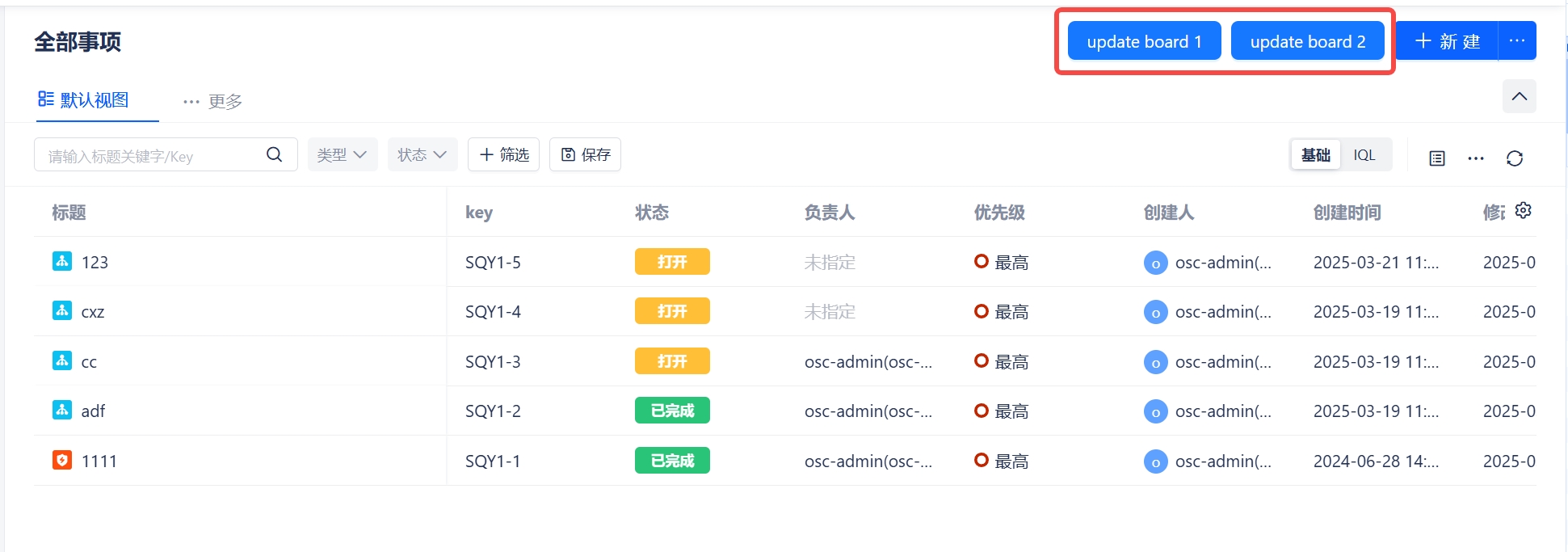
Manifest Example
modules:
  proxima:boardAction:
    - key: board-action
      title: Board Action
      loadType: Micro
      resource: main
      route: /board-action
resources:
  - key: main
    path: ./dist
Properties
| name | type | required | description |
|---|---|---|---|
| key | String | Yes | A key for the module, which other modules can refer to. Must be unique within the manifest. Regex: ^[a-zA-Z0-9_-]+$ |
| resource | String | Yes | A reference to the static resources entry that your app page wants to display. See resources for more details. |
| title | String | Yes | The title of the app page, which is displayed at the top navigation of Team Header. |
| loadType | Micro | Yes | The app's rendering method |
| route | String | false | The app route, default / |
Custom UI Example
You can use the updateBoard method in proximaSdk to update the current board's data (it won't save to the database, only affects the current board's display)
import { proximaSdk } from '@giteeteam/proxima-sdk-js';

const BoardAction = props => {
  const { context } = props;
  const board = useRef(context.board);
  const updateBoard = name => {
    board.current.name = name;
    board.current.extend.iql = `baseLine = ${name}`;
    console.info('updateBoard', board.current);
    proximaSdk.execute('updateBoard', board.current);
  };

  return (
    <div className={cx('context')}>
      <Space>
        <Button type="primary" onClick={() => updateBoard('board1')}>
          update board 1
        </Button>
        <Button type="primary" onClick={() => updateBoard('board2')}>
          update board 2
        </Button>
      </Space>
    </div>
  );
};