Branch
Branch is used to handle multiple items, such as: sub-items, related items, etc.
Or use advanced branch functionality to process a field as an array and execute in a loop.

Current Item
There is a default item in an automation rule, for example: when an item is created -> modify a certain field of the item, at this time the newly created item is the implicit default item, which is the definition of the current item.
However, in the logic after branch, the current item changes from the trigger item to the item selected by Branch, and as the loop executes, the cursor of the current item also moves down with the loop.
You can also use expressions to get fields of the current item: #{item.xxx}#
Trigger Item
In Branch branches, there are also scenarios where you need to use fields from the trigger item. At this time, you can select under the field copy function:
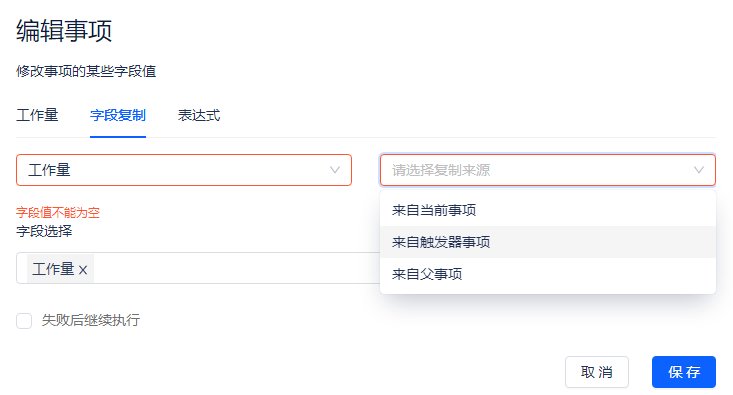
You can also use expressions to get fields: #{triggerItem.xxx}#
Tips: Without Branch, current item and trigger item refer to the same item.
Branch Rules/Related Items
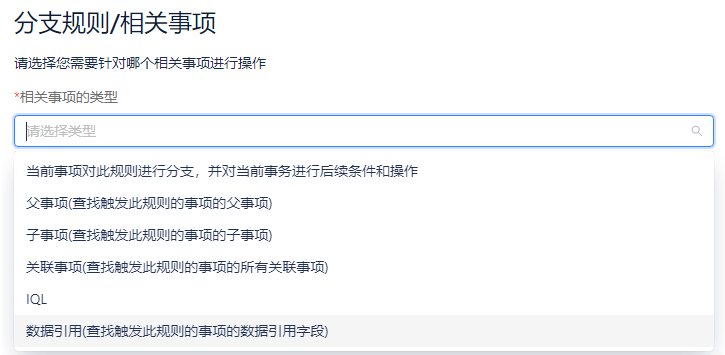
The functionality of related items is involved in branch, related item conditions, related item field aggregation nodes, and the logic is consistent across all three.
Related items include:
- Sub-items: Items one level down in the item hierarchy
- Parent item: Items one level up in the item hierarchy
- Related items: Items can be filtered based on relation type
- Data reference: Items can be processed based on data reference fields
- IQL: Items can be freely selected by writing IQL, and expressions can be used to concatenate IQL
Advanced Branch
You can traverse an array field, execute a piece of logic in a loop, and define a variable that can be used in subsequent nodes. For example:
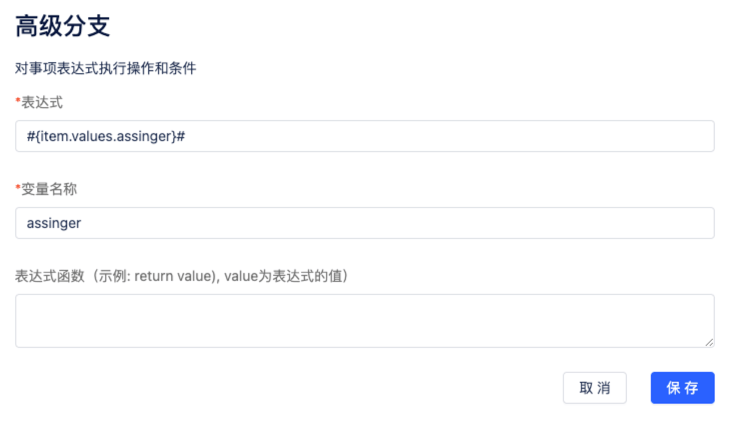
The above figure will traverse the assignee field, and in each loop you can use the #{assigner}# variable to get the value of the assignee field.
If the field is not an array, it will be interpreted as an array with only one element.
Expression: Can be an item field or a web request return value, as long as the expression supports it.
Variable name: Subsequent nodes can use expressions to get this variable. The value in the above figure can be obtained using the expression: #{assigner}#
Expression function: Custom splitting logic can be defined. Default is empty. Can be a piece of js code with built-in value parameter as field value (array), returning an array.
Expressions
Expressions are implemented based on the javascript language, wrapped with #{}# as one javascript statement, and can be used in all text input boxes to generate dynamic content by concatenating with strings. Such as:
- Dynamic title:
#{item.name}#-sub-item - Dynamic IQL:
parent item='#{item.key}#' and status='completed' - Dynamic json:
{ "name": "#{item.name}#" } - Dynamic url: http://localhost/item/#{item.objectId}#
- Mathematical or logical calculations:
#{triggerItem.values.manHour-item.values.manHour}# - js built-in function support:
#{JSON.stringify(item.values)}# - Mixed usage:
#{item.name}#:#{Math.floor(item.values.manHour / 8)}# - Concatenate arrays:
#{item.values.assigen.map(u => u.username).join()}# - Assign empty: All types can basically be written as
#{''}
Supported Functions
-
toPointer(expression, className): Convert objectId to entity object. className can be: Workspace, Item, Version, Status, etc. Usually used to convert web request return values to proxima entity objects.
- Example:
#{toPointer(webResponse.automation_2022112012091232.body.objectId, 'Workspace')}#
- Example:
-
encodeURIComponent(expression)can be used as replacement. -
dateFormat(expression, formatter): Date format conversion. Default format is: yyyy-MM-dd HH:mm:ss. Supports several simple date separators (Chinese not supported).
- Such as:
#{dateFormat(item.createdAt)}#or#{dateFormat(item.createdAt, 'yyyy-MM-dd')}#
- Such as:
-
moment function: Built-in $moment object, can be used directly:
#{$moment(item.createdAt).add(1, 'days').format('yyyy-MM-DD')}#
Expression Values
-
item: Current item
-
triggerItem: Trigger item
-
triggerNode: Raw data of trigger node
- actor: Automation executor, formatted as json, containing keys:
- username: Username
- nickname: Nickname
- objectId: User id
- originalItem: Item before modification, same format as current item. This object does not exist for item creation automation
- tenant: Tenant
- itemLink: Item relation, only available in item relation related triggers
- destination: Related item, only available in item relation related triggers
- actor: Automation executor, formatted as json, containing keys: